Version 2.1.3
Address Verification and Offboarding Fixes
Released on 12-Sep-2025

Current address verification
Staff are prompted with a notification every six months to confirm whether their current address is still valid. They can confirm via the notification or update the address in their personal details section.
Offboarding bug fixes
Resolved several issues in the offboarding module to ensure smoother processing.
Version 2.1.2
Admin and Manager Staff Access
Released on 25-Aug-2025
Staff portal access for admins and managers
Administrators and managers now have staff portal access, enabling them to manage their own attendance, leave, documents, shifts, and more.
Version 2.1.1
Exit Interview Options and Shift Copying
Released on 11-Aug-2025
Exit interview meeting options
Exit interviews now support both online and offline meeting formats. Online meetings can include links or integrated Google Meet links, while offline meetings can specify a physical location. Notifications are sent to staff accordingly.
Shift copy and paste
Administrators can copy shifts for a day, week, or month and paste them onto other days, weeks, or months for faster scheduling.
Version 2.1.0
Offboarding and Resignation Management
Released on 21-Jul-2025
Offboarding
A new offboarding process has been introduced with features for scheduling exit interviews, ensuring return of company property, completing paperwork, and managing knowledge transfer through a structured checklist.
Resignation management
Staff can now submit resignation requests directly from the staff portal. Administrators can manage these requests via a new “Resignations” tab in the admin portal’s request section.
Version 2.0.8
Rota and Document Tracking
Released on 01-Jul-2025
Rota checklist
Checklists can now be assigned to staff alongside shifts. Staff must complete the checklist before they can finish their assigned work.
Branch calendar improvements
The branch calendar now displays eVisa expiry dates and other document expiry details.
Version 2.0.7
Shift Scheduling Improvements
Released on 02-Jun-2025
Repeat shift option
Shifts can now be scheduled to repeat weekly or monthly for selected days, reducing the need for repetitive manual assignment.
Shift reminders
Staff can receive shift start and end reminders via email.
Version 2.0.6
eVisa and Compliance Updates
Released on 12-May-2025
eVisa details and notifications
Staff receive notifications three months before their eVisa expiry. They can upload and update their new eVisa documents directly from the staff portal, while administrators can review and verify them via the admin portal.
Advanced settings
Added an option to hide branches when required.
UKVI Compliance fixes
Addressed several bugs related to UKVI compliance.
Version 2.0.5
Attendance Reporting and Compliance
Released on 28-Apr-2025
Missed attendance report
Admins now receive a detailed, auto-generated monthly report via email containing information on staff members who missed marking attendance, including the specific dates and expected working days. An attached spreadsheet with complete details is also provided.
Attendance import
Staff attendance records can now be imported as a downloadable CSV file.
Right to Work check reminders
Administrators receive email reminders when a staff member’s Right to Work share code is nearing expiry or has already expired.
Version 2.0.4
ID Card and Policy Access
Released on 14-Apr-2025
Staff ID card
Staff can now view their ID card directly from their profile.
Policy document access
Once a policy is signed, staff can view their signed copy in the policy section.
DBS document upload
Through the admin portal, administrators can upload DBS certificates for UK-based staff. The history of uploads is also stored for reference.
Version 2.0.3
Improved Staff Profile
Released on 10-Mar-2025
Staff profile enhancement
The staff profile section has been redesigned with three separate areas: Personal Details, Company Details, and a new Next of Kin section.
Update and approval process:
Staff can update their information, while administrators can approve or reject these changes through a new set of dedicated tabs in the admin portal’s requests section.
Version 2.0.2
Attendance and Leave Enhancements
Released on 24-Feb-2025
Approved leave deletion
If a leave request has been approved but the leave date has not yet passed, staff now have the option to delete it.
Edit leave requests from staff calendar
Leave requests can now be edited directly from the staff calendar before HR approval.
Attendance change request bug fixes
Resolved issues affecting attendance change requests and addressed several minor bugs across the section, improving overall performance.
Rota management bug fixing
Resolved several minor bugs to improve stability and overall system performance.
Version 2.0.1
Attendance change request
Released on 02-Feb-2025
Attendance change request
Staff can edit the start and end times of marked attendance and add entries for missed days.The admin can review and either approve or decline these requests.

Sponsorship management
CoS filtering for improved accuracy and compliance in sponsorship management.
Delegates with restricted access
Delegates with access restricted to email notifications only, without other system permissions.
Rota management bug fixing
Resolved several minor bugs to improve stability and overall system performance.
Version 2.0
Rota Management
Released on 06-Jan-2025
Efficient Shift Allocation
Create and assign shifts to ensure smooth workforce operations. Enable managers to plan schedules efficiently, assign shifts to staff, reduce conflicts, and enhance team productivity and organizational workflow.

Shift Swaps & Optimization
Easily swap shifts between staff while ensuring balanced and fully covered schedules
Leave & Attendance Management
Validate leave,assign shifts and mark attendance efficiently.
Comprehensive Staff Management
Effectively manage remote and temporary staff.
Dynamic calendar for shift views
View assigned shifts with a dynamic and user-friendly calendar.
Optimised Workforce Planning
Enhance productivity with optimised scheduling tools for efficient planning.
Version 1.9.0
Geofencing for Attendance
Released on 02-Dec-2024
Geofencing for Attendance
We've introduced Geofencing to ensure accurate attendance tracking. Staff can mark attendance only when they are within the designated office or work location, preventing check-ins from outside approved areas. This optional feature can be enabled or disabled as needed, offering flexibility while enhancing reliability.

Version 1.8.0
Enhanced Staff Portal Dashboard
Released on 07-Oct-2024
Mood Tracking
Easily mark how you feel each day.

Meeting Reminders
Stay informed with reminders for your upcoming meetings.
Assigned Shifts
View your scheduled shifts for today and upcoming shifts at a glance.
Attendance & Holidays
Keep track of your attendance records and holiday details.
Birthdays
See today’s and upcoming staff birthdays.
Accurate Leave Balance
Your updated and correct leave balance is now displayed accurately!
Branch Holiday Overview
Quickly check which employees from your branch are on holiday.
Version 1.6.0
Custom Staff Documents & Google Calendar Integration
Released on 16-Sep-2024
Custom Staff Documents
Admins can now add custom documents for individual staff members in addition to branch documents. Staff members receive notifications when a document is assigned to them and can easily upload the required files through their staff portal.
Broadcast Messages & Google Calendar Integration
Admins can now schedule online or offline meetings effortlessly. After selecting the invitees and scheduling or sending the broadcast message, this section automatically sends email invitations with details including Google Meet or custom meeting links for online sessions and location details for offline meetings. Additionally, all scheduled meetings are automatically added to the invited staff's Google Calendar, ensuring better organization and coordination.
Version 1.5.0
New Mood Tracking Feature & Enhanced UKVI Dashboard
Released on 12-Aug-2024
Mood Tracking Feature
Staff can now indicate how they feel each day through the staff portal. This feature enhances employee well-being and engagement by providing a simple way to share moods, fostering a more supportive workplace environment.
Enhanced UKVI Dashboard
The new and improved UKVI dashboard provides admins with a centralized and user-friendly interface, making it easier to manage branch compliance and documentation.
Key enhancements:
- All-in-One View: Access all essential information in one place for a seamless experience.
- Color-Coded Branches: Easily identify branch issues through a clear color-coded system.
- Reminder Notifications: Get reminders for expiring documents to ensure timely renewals.
- Annual Insights Graph: View overall compliance trends with a yearly insights graph.
- Easy Document Uploads & Verification: Upload and manage documents directly through the dashboard for greater efficiency.
Version 1.4.0
GeoTracking
Released on 21-May-2024
GeoTracking
You can now precisely track the locations where your employees mark their attendance. Additionally, you can analyse the method they used to clock in, whether it's via mobile, desktop, or biometric.
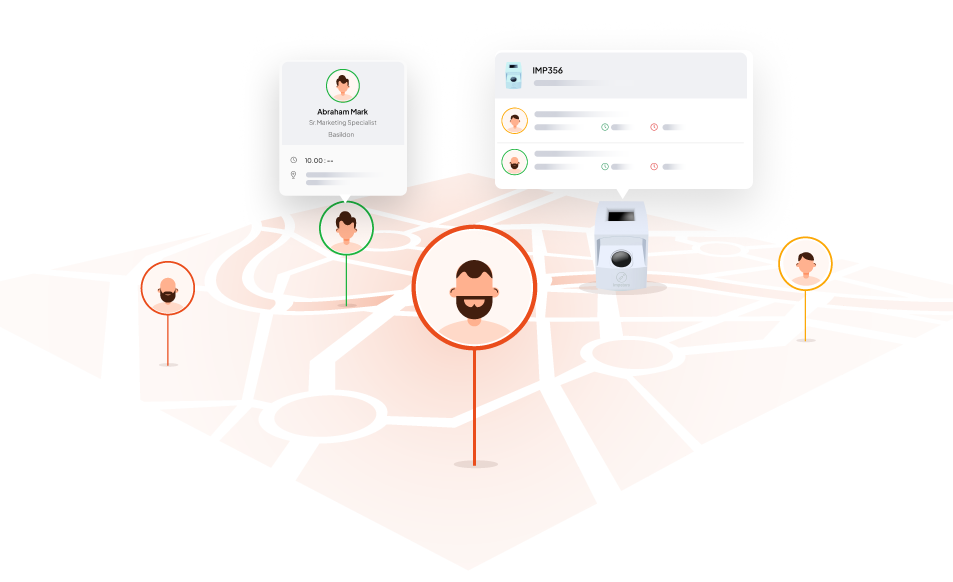
Accountability
Ensure employees are marking attendance from approved locations.
Accuracy
Gain insights into attendance patterns and locations.
Compliance
Verify that remote or field employees are where they should be during work hours.
Version 1.3.8
Departmental Delegate Access
Released on 14-May-2024
Departmental Delegate Access
Empower department heads to oversee specific departments within your organisation. Easily segment responsibilities by creating distinct departments and granting access control to designated department heads. Define the precise access levels they can administer.

Version 1.3.5
AI-Policy Generator
Released on 01-May-2024
Instantly generate your company policies with Impetors HR AI
With just one click, you can now effortlessly align your company policies with your values and needs. Save your time by eliminating lengthy policy creation hurdles while ensuring compliance.

Version 1.3.4
Broadcast Messages
Released on 14-Apr-2024
Broadcast Messages
Send out broadcast messages to staff, including individuals, branches, or departments directly from the admin portal. You can also create groups and send messages to those groups or any created groups. Options for broadcast include email and push notifications, and you can attach multiple documents to the broadcast email. You can send, schedule, and draft broadcast messages, and view them in an overview table with options to edit, delete, and copy.

Public and calendar holiday integration with leave system
You can conveniently view public holidays and company calendar holidays in the calendar section to manage your leaves effectively from the staff login. HR can also add company-specific leaves to simplify leave decisions for staff. Additionally, you can view your leave count, including taken and available leaves, on the staff login to plan your leaves based on the available leaves and holidays.
Version 1.3.3
Biometric Settings
Released on 30-Mar-2024
Enhanced Biometric System
We have enhanced our biometric system to offer customization options for multiple check-in and check-out timings, as well as the ability to set office hours and break times.

Version 1.3.2
Two Factor Authentication
Released on 11-Mar-2024
Enhanced Security
An additional layer of security is implemented to ensure your account security. Start by logging in using your username and password.Then you will be prompted to enter a code sent to your phone or email. Therefore, if someone gains access to your password, they would also need to access your second-factor device to enter your account.
Easy Account Switching
The account switching option allows staff with delegate access to switch between the admin portal and the staff portal with a single click, avoiding the need to log out and log back in.

Version 1.3.1
Bug Fixing
Released on 24-Feb-2024
Image Upload
All image upload issues in the HR software have been resolved.
Select Box
All issues related to the select boxes in our HR software have been successfully resolved.
Version 1.3.0
Google Login
Released on 13-Feb-2024
Google login and otp based login
We have enhanced the login for our HR software by implementing the feature to log in to your account using Google accounts and the option to log in using OTP (one-time password) verification.
Forgot password option
Our HR software's login experience has been improved with the addition of a 'Forgot Password' feature. This enhancement enables you to easily recover access to your accounts by using recovery options in case you forget your password.
Biometric advanced coding
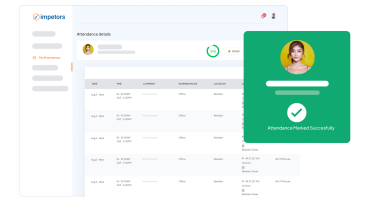
The biometric system now features enhanced functionality to automatically reconnect when the internet connection is restored. Additionally, users can conveniently view login information directly on the biometric display. In the event of any issues, the system resets to its original state for seamless operation.